
The CRM that does the busywork for you.
44CRM drafts your replies, turns call notes into tasks, builds contacts from a business card and tells you what needs you next. You stay in charge: nothing is sent or saved until you approve it.
- Send written pricing for 12 desks + 12 chairs
- Book the Thursday site visit
- Email Gina the volume discount sheet
See a lead go from first email to closed.
A quick walkthrough: add a lead, plan the tasks, work your day and close it out, with every email and call logged on the way.
44CRM tour · 2:20 · captions available
Eight AI helpers built into the CRM. You approve every step.
They're not bolted on. They're built into email, contacts, tasks and your dashboard. Each one shows what it used, follows your permissions and waits for your OK.
Start the day knowing exactly what needs you.
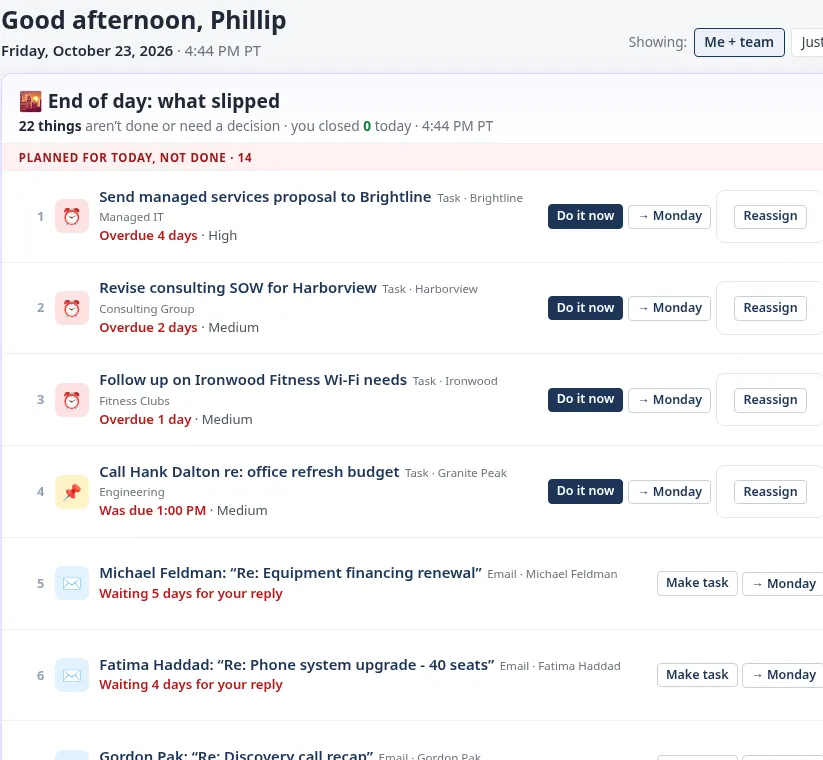
One ranked list of everything that slipped, is due or is waiting on you: overdue tasks, unanswered emails, follow-ups you promised. Handle each one in a click.
- Morning plan and an end-of-day “what slipped” view
- Do it now, push to Monday, reassign or snooze
- Optional morning digest email
Replies that sound like you, with the receipts.
Click Draft reply. 44CRM writes a response from the email thread, the contact, the account, your notes and your product list, and shows you every source it used.
- Untick a source and regenerate to leave it out
- Friendly, Professional or Short, plus ✨ Improve and Dictate
- Fields hidden from you are never read or written into a draft
 Email › Reply✨ What’s next
Hi Dana,
Yes, we can add the 12 seats before your new clinic opens on March 3. Setup for each one includes email, the shared calendar and the front-desk scheduling app.
You mentioned Tuesday mornings work best. Would Tuesday at 9:30 work for a 20-minute call to confirm the details?
Thanks,
Sam
📚 Sources used
name, job title, notes
name, description
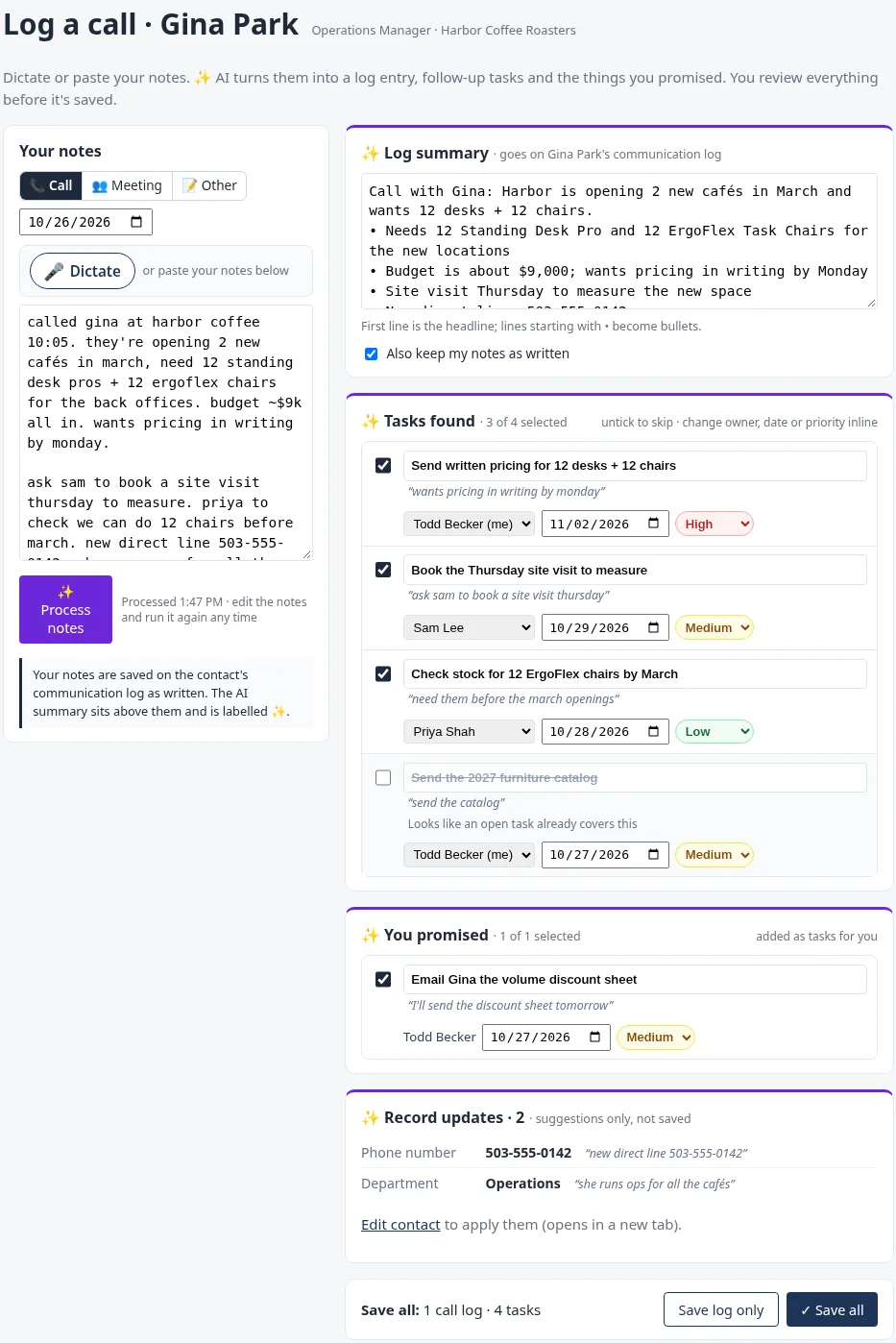
Talk or type your notes. Get the log entry and the to-do list.
Paste or dictate rough notes after a call. 44CRM writes a clean log summary, pulls out the tasks (with owners, dates and priority) and catches what you promised.
- Spots tasks that are already open, so you don’t get duplicates
- Suggests record updates, like a new direct line
- Review everything, then Save all
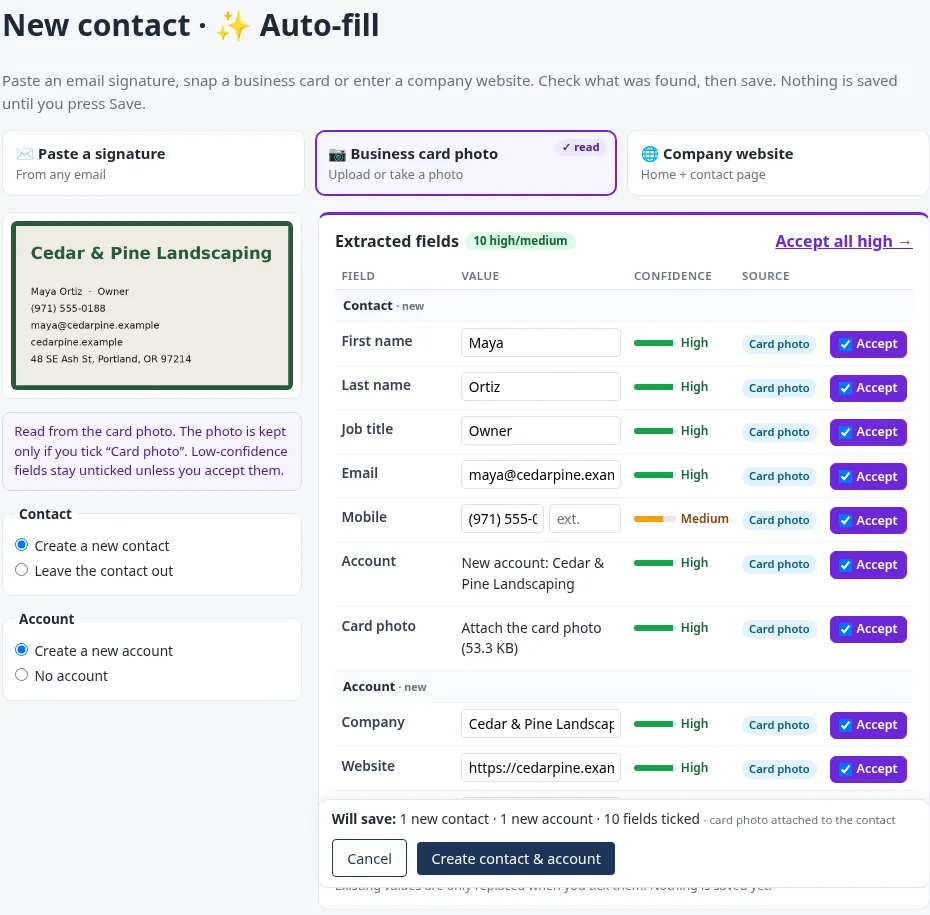
Snap a business card. Get a contact and an account.
Paste an email signature, upload a business-card photo or enter a company website. 44CRM pulls out the fields, shows how sure it is about each one and fills only what you accept.
- High, Medium and Low confidence on every field
- Low-confidence fields stay unticked until you accept them
- Smart paste imports a whole list in one go
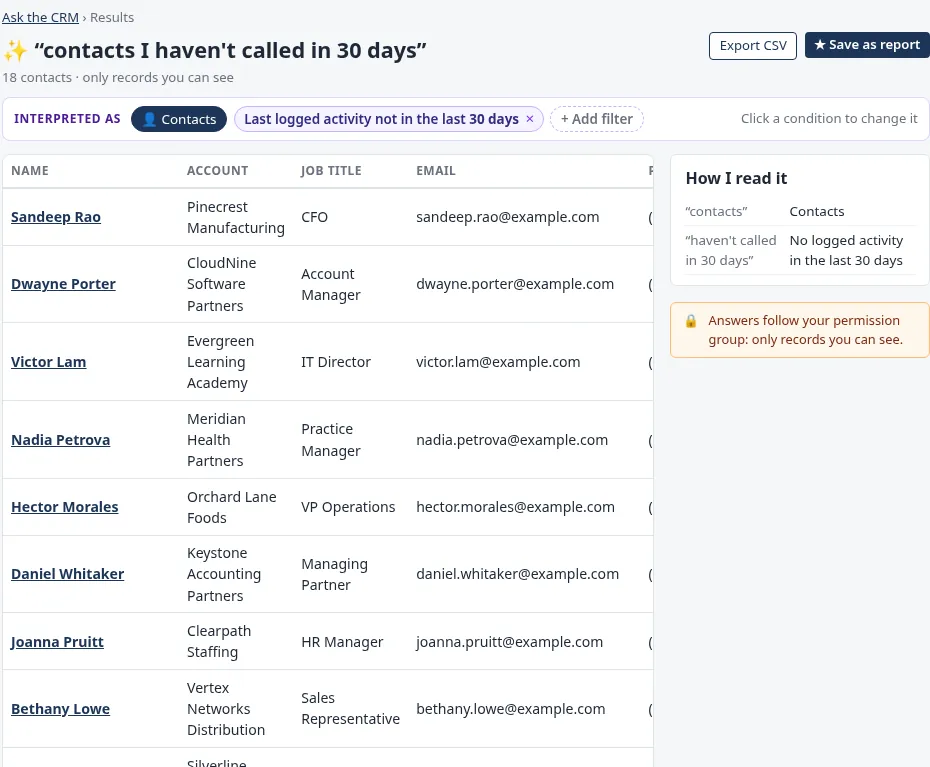
Ask in plain English. Get a list you can act on.
“Contacts I haven’t called in 30 days.” “Overdue tasks for Megan.” 44CRM shows how it read your question as filters you can change, then lets you export the results or save them as a report.
- Answers only include records you’re allowed to see
- Export to CSV or save as a report in one click
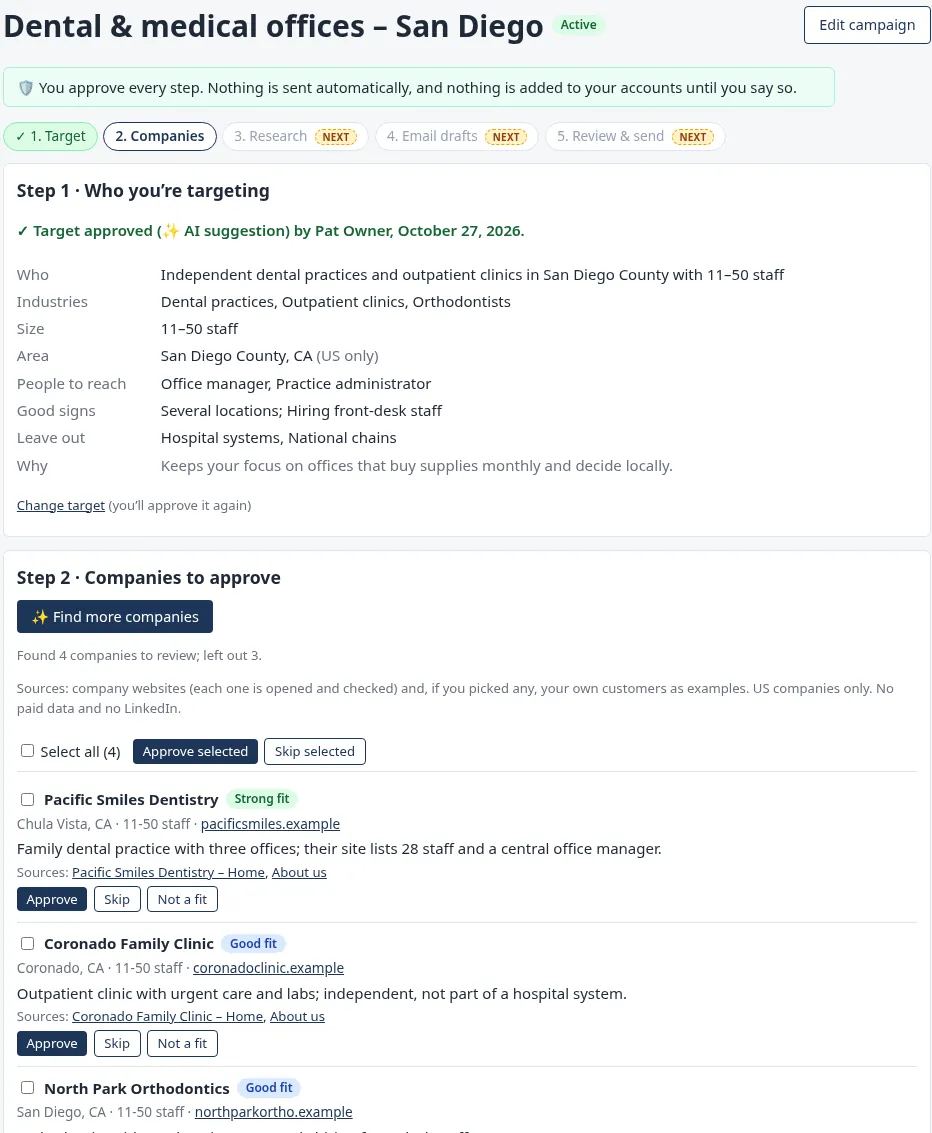
Find new customers that fit, one approval at a time.
Describe who you sell to. 44CRM suggests a target, finds companies from their public websites and explains why each one fits. You approve each step, and nothing is sent automatically.
- Every company links to the pages it came from
- Do-not-contact list built in
- No paid data lists and no LinkedIn scraping
Find buyers
On any product, see the customers most likely to buy, with the reason, then draft emails for the ones you pick. Drafts only.
Weekly summary
A Monday email for the Owner: new leads, overdue work by person, replies waiting and the week ahead.
Writer & ✨ Improve
Fix grammar, make it shorter, friendlier or more professional, or clean up dictation. Works on just the part you select.
Dictate anywhere
Talk instead of type in emails, notes and subjects, then let ✨ Improve tidy it up.
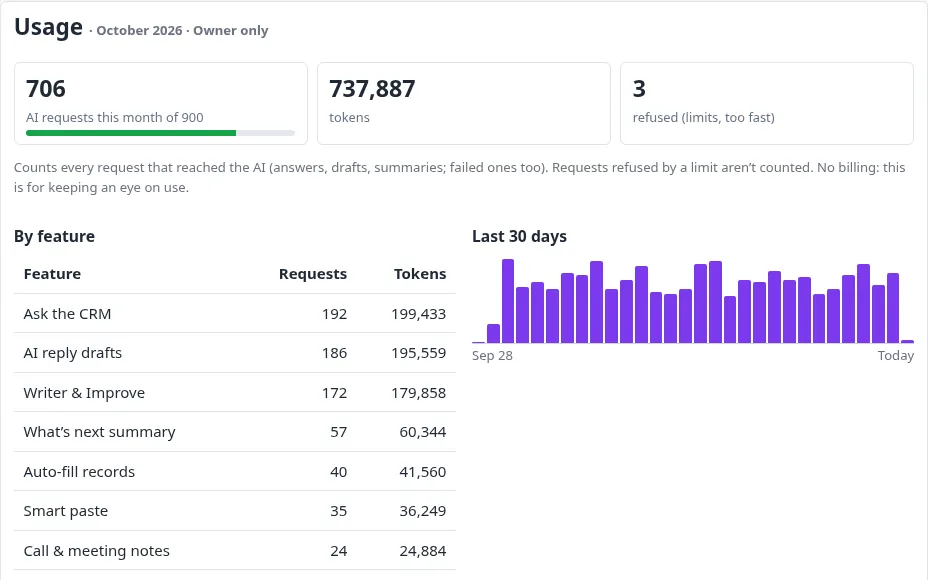
Powerful AI, on your terms.
The account Owner decides who can use each AI feature, sets monthly limits for each person and for the company, and sees usage by feature and by user.
- Approval-first: AI drafts and suggests. People send and save.
- Permission-aware: AI only sees the fields and records that person can see.
- Usage caps: alerts at 80% and a hard stop at the limit.
A complete CRM for small business, already built.
Contacts, email, tasks, calendar, inventory and team controls, all working together.
👥Contacts & accounts
- Contacts and accounts with a complete communication log
- Edit history on contacts and accounts
- Side-by-side duplicate compare
- Save to Google, Outlook or iCloud Contacts
- Import with mapping, preview and undo, and CSV export
✉️Email that logs itself
- Gmail (multiple accounts and send-as aliases), Outlook and iCloud
- Every email is logged to the right contact and account
- Reply tracking with notifications
- Drafts, scheduled send, signatures with logos and canned replies
- AI reply drafts, Writer and ✨ Improve
✅Tasks that get closed
- Tasks with priority, schedule and reminders
- Several people on a task, each closing their part
- Files on tasks, plus bulk actions
- Archive, trash and restore
- Products on tasks Inventory
📅Calendar
- Google Calendar sync
- Events and appointments with recurrence
- Month, week, day, agenda and list views
- .ics invites and an iCal subscription feed
🏠Dashboard & search
- Customizable dashboard with defaults for each role
- Global search and saved filters
- Notifications with snooze
- Quick add from anywhere
- Works in your phone's browser
📦Inventory & reports Add-on
- Products, images and stock movements
- CSV import and export
- Report builder with calculated fields and formulas
- PDF, Excel and CSV export, plus print, email and schedules
- Find buyers for any product
🔄QuickBooks Online Add-on
- Two-way sync with QuickBooks Online
- Match wizard for existing customers
- Sync log with one-click retry
- Linked accounts on every record
🛡️Team admin Team
- Invite, add, disable and transfer users
- Roles and permission groups
- Field-level permissions: Edit, View only or Hidden
- View-as any user, with an access log
- Team activity log
🔀Assignment Team
- Assignment rules, with a test on a sample record
- Bulk reassign with undo
- An unassigned queue on the dashboard
- Team task overview
From new lead to closed, nothing slips.
A lead comes in
From an email, a business card, a website or an import. Auto-fill builds the contact and account.
✨ Auto-fillTasks get planned
Assignment rules route it to the right person. Tasks get owners, dates and reminders.
Assignment rulesYou work the day
What’s next ranks what needs you. Reply drafts and call notes do the typing.
✨ What’s nextEvery touch is logged
Emails are logged to the record automatically, and call and meeting notes go there too, so anyone can pick it up.
Communication logClosed, and counted
Close the tasks, sync the customer to QuickBooks and see it in Monday’s summary.
DoneIndividual or Team. Same CRM, same AI.
Start on your own, then bring your team in when you're ready. Nothing to migrate.
For one person running the business
Owners, solo sellers and consultants who want everything in one place.
- Contacts, accounts, tasks, calendar and email
- All the AI helpers: drafts, notes, auto-fill, Ask, What’s next
- Gmail, Outlook and iCloud
- Imports, exports and a dashboard you can customize
- Inventory and QuickBooks Online add-ons
For a business with people to coordinate
Everything in Individual, plus the controls to run a team.
- Users, roles and permission groups
- Field-level permissions: Edit, View only or Hidden
- View-as any user, with an access log
- Assignment rules and bulk reassign with undo
- Team dashboard, team activity and the Owner’s weekly summary
- Owner AI controls and limits for each person
Your contacts, emails, tasks and history stay exactly where they are. You become the Owner and invite your teammates.
Your customers’ data stays yours.
Here's how 44CRM protects your data, in plain language and with no fine print.
Walled off at the database
Each company’s data is kept separate by database row-level security, not just by app code, so one company's records can't show up in another company's account.
Hidden means hidden
Hidden fields are removed on the server. They don't appear in lists, searches, exports, reports or AI.
AI waits for you
AI suggests and drafts. Nothing is sent, saved or changed until a person approves it.
Audit trails
Edit history on contacts and accounts, a team activity log and an access log every time someone uses View-as.
Owner in control
Turn each AI feature on or off for each group, and set monthly usage limits.
Take it with you
Export your contacts and accounts to CSV anytime, including after a trial ends.
Card payments are handled by our payment processor’s hosted fields. Your card number never touches 44CRM’s servers. (Planned for launch.)
An honest comparison.
Where 44CRM is ahead, and where we're still building, based on each vendor’s public pages as of October 30, 2026.
| Capability | 44CRM | HubSpot | Salesforce | Zoho CRM | Pipedrive | monday CRM | Freshsales |
|---|---|---|---|---|---|---|---|
| AI | |||||||
| AI email drafts | ✓shows its sources | ✓credits | ◐Agentforce add-on | ◐higher tiers | ◐Premium+ | ✓AI credits | ◐Freddy add-on |
| Ask the CRM in plain English | ✓ | ✓ | ◐add-on | ◐higher tiers | ✓ | ✓ | ◐add-on |
| Email, records & operations | |||||||
| Gmail + Outlook + iCloud mail | ✓all three | ◐Gmail, Outlook | ◐Gmail, Outlook | ◐Gmail, Outlook | ◐Gmail, Outlook | ◐Gmail, Outlook | ◐Gmail, Outlook |
| Inventory + QuickBooks Online sync | ✓add-ons | ◐marketplace | ◐AppExchange | ◐higher tiers | ◐marketplace | ◐integrations | ◐marketplace |
| Field-level permissions | ✓Team | ◐higher tiers | ◐higher tiers | ◐higher tiers | ◐Premium+ | ◐higher tiers | ◐Enterprise |
| Where we’re still building | |||||||
| Deal pipeline & forecasting | —not yet | ✓ | ✓ | ✓ | ✓ | ✓ | ✓ |
| Workflow automation builder | ◐assignment rules | ◐Professional+ | ✓ | ✓ | ✓ | ✓ | ✓ |
| Web forms / lead capture | —not yet | ✓ | ✓ | ✓ | ◐LeadBooster | ✓ | ✓ |
| Native iOS & Android apps | ◐mobile web | ✓ | ✓ | ✓ | ✓ | ✓ | ✓ |
| Public API & app marketplace | —not yet | ✓ | ✓ | ✓ | ✓ | ✓ | ✓ |
| Free trial / free tier | 30-day trial | Free tier | 30-day trial | Free tier | 14-day trial | 14-day trial | 21-day trial |
Comparison based on each vendor’s public product and pricing pages, checked October 30, 2026: hubspot.com/products/sales, salesforce.com/sales/pricing, zoho.com/crm/zohocrm-pricing.html, pipedrive.com/en/pricing, monday.com/crm/pricing, freshworks.com/crm/pricing. Features, tiers and names change often and differ by plan and region. “◐” means the vendor offers it on some plans, as a paid add-on or through a third-party app. 44CRM add-ons (Inventory, QuickBooks Online) are optional. All trademarks belong to their owners. We have no affiliation with any vendor listed. Spot something out of date? Tell us and we’ll fix it.
Pricing coming soon.
We’re finalizing Individual and Team pricing. Join the list to get launch pricing first and to start your 30-day free trial, or ask us for a demo.
Start with Individual, upgrade to Team anytime, and your data comes with you.
Questions, answered.
Does the AI send emails or change records on its own?
No. Every AI feature drafts or suggests and then waits for you. You press Send. You tick the tasks to create. You accept the fields to fill. Prospecting doesn't send anything automatically.
What’s the difference between Individual and Team?
Individual is for one person. Team adds users, roles, permission groups, field-level permissions, View-as, assignment rules and team reporting. You can start with Individual and upgrade to Team anytime, and all your data comes with you.
Which email providers work with 44CRM?
Gmail (including multiple accounts and send-as aliases), Microsoft Outlook and iCloud Mail. Emails are logged to the right contacts and accounts, and replies are tracked.
Is there a mobile app?
44CRM is built to work in your phone's browser, with dictation for notes and emails. There's no App Store or Google Play app yet.
Can I bring my data in, and take it out?
Yes. Import contacts and accounts from CSV with field mapping, a preview and undo, or paste a list and let Smart paste sort it. You can export to CSV anytime.
How much does it cost?
Pricing is coming soon. Join the waitlist and we’ll let you know first. The free trial is 30 days.
Who can see what the AI sees?
AI follows the same permissions as the person using it. Fields hidden from you are never read, shown or written into a draft. The Owner can turn each AI feature on or off for each group and set limits.
Let 44CRM do the busywork.
Start on your own with Individual. Bring your team when you’re ready.